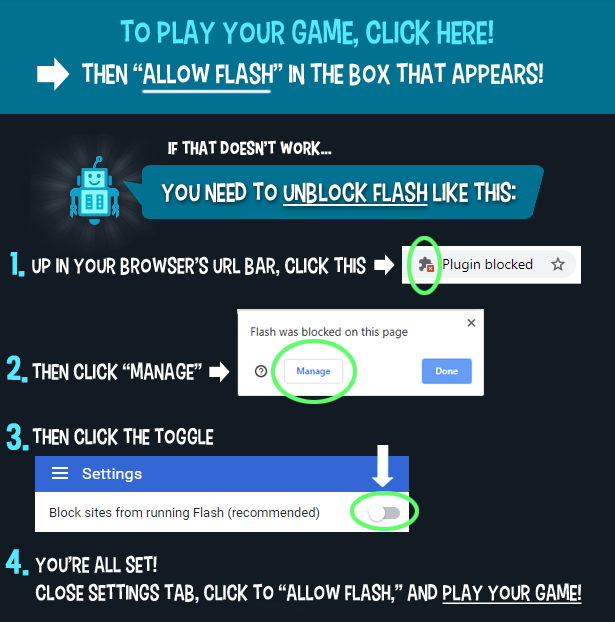


申し訳ありません...このゲームはブラウザで再生できません。


レビューしたゲーム内容Jonathan Keefer
指示
Fill up the factory with as much butter as you can! Each piece of butter comes in its own unique shape that you will need to place on the grid. Move your mouse to find the spot to place your butter. If you want to rotate the butter, use the Left / Right Arrow Keys to rotate it counterclockwise or clockwise, or click the arrows on the right side of the screen. Once you're ready to place your butter, click to place it. You can see how many pieces of butter need to be filled into the grid by the quota shown on the left side of the screen.
You'll see the next piece of butter to place on the right side of the screen. If you can't fit a butter cube on the grid, throw it in the trash bin on the left side of the screen. If you don't trash any pieces for the round, you'll earn bonus points!
If you fill up a row or column with butter, you'll score even more points! Once the board has been filled with as much butter as possible, the butter will be removed from the grid to be delivered. Any spaces that were not filled with butter will be placed with blocker tiles. These tiles will not allow you to place butter there. Each blocker tile has a number showing how many rounds it will stay on the board. After each round, that number will decrease by one.
As you progress, you will get "eraser" versions of butter shapes. These shapes will be translucent and can be placed on existing butter blocks to remove them from the grid and free up more space.
工場にできるだけたくさんのバターを詰め込みましょう!バターはそれぞれ独自の形状をしており、グリッド上に配置する必要があります。マウスを動かしてバターを配置する場所を見つけてください。バターを回転させたい場合は、左右の矢印キーで反時計回りまたは時計回りに回転させるか、画面右側の矢印をクリックしてください。バターを配置する準備ができたら、クリックして配置します。画面左側に表示される割り当て量で、グリッドに詰め込むバターの個数を確認できます。
画面右側に、次に置くバターが表示されます。バターの塊がグリッドに収まらない場合は、画面左側のゴミ箱に捨ててください。ラウンド中にバターを捨てなければ、ボーナスポイントを獲得できます!
行または列をバターで埋め尽くすと、さらに多くのポイントを獲得できます!ボードが可能な限りバターで埋め尽くされると、バターはグリッドから取り除かれ、配達されます。バターで埋められなかったマスには、ブロッカータイルが配置されます。これらのタイルにはバターを置くことができません。各ブロッカータイルには、ボード上に残るラウンド数を示す数字が書かれています。各ラウンド終了後、その数字は1ずつ減少します。
ゲームを進めていくと、バターの形をした「消しゴム」バージョンが手に入ります。これらの形は半透明で、既存のバターブロックの上に配置することで、グリッドからバターブロックを削除し、より多くのスペースを確保できます。

Just a moment while your advertisement loads
広告
Just a moment while your advertisement loads
広告
レビューしたゲーム内容Jonathan Keefer
指示
Fill up the factory with as much butter as you can! Each piece of butter comes in its own unique shape that you will need to place on the grid. Move your mouse to find the spot to place your butter. If you want to rotate the butter, use the Left / Right Arrow Keys to rotate it counterclockwise or clockwise, or click the arrows on the right side of the screen. Once you're ready to place your butter, click to place it. You can see how many pieces of butter need to be filled into the grid by the quota shown on the left side of the screen.
You'll see the next piece of butter to place on the right side of the screen. If you can't fit a butter cube on the grid, throw it in the trash bin on the left side of the screen. If you don't trash any pieces for the round, you'll earn bonus points!
If you fill up a row or column with butter, you'll score even more points! Once the board has been filled with as much butter as possible, the butter will be removed from the grid to be delivered. Any spaces that were not filled with butter will be placed with blocker tiles. These tiles will not allow you to place butter there. Each blocker tile has a number showing how many rounds it will stay on the board. After each round, that number will decrease by one.
As you progress, you will get "eraser" versions of butter shapes. These shapes will be translucent and can be placed on existing butter blocks to remove them from the grid and free up more space.
工場にできるだけたくさんのバターを詰め込みましょう!バターはそれぞれ独自の形状をしており、グリッド上に配置する必要があります。マウスを動かしてバターを配置する場所を見つけてください。バターを回転させたい場合は、左右の矢印キーで反時計回りまたは時計回りに回転させるか、画面右側の矢印をクリックしてください。バターを配置する準備ができたら、クリックして配置します。画面左側に表示される割り当て量で、グリッドに詰め込むバターの個数を確認できます。
画面右側に、次に置くバターが表示されます。バターの塊がグリッドに収まらない場合は、画面左側のゴミ箱に捨ててください。ラウンド中にバターを捨てなければ、ボーナスポイントを獲得できます!
行または列をバターで埋め尽くすと、さらに多くのポイントを獲得できます!ボードが可能な限りバターで埋め尽くされると、バターはグリッドから取り除かれ、配達されます。バターで埋められなかったマスには、ブロッカータイルが配置されます。これらのタイルにはバターを置くことができません。各ブロッカータイルには、ボード上に残るラウンド数を示す数字が書かれています。各ラウンド終了後、その数字は1ずつ減少します。
ゲームを進めていくと、バターの形をした「消しゴム」バージョンが手に入ります。これらの形は半透明で、既存のバターブロックの上に配置することで、グリッドからバターブロックを削除し、より多くのスペースを確保できます。

投票